CoNNECT Broad Analysis Tools
There are many custom analysis tools that have been developed to provide broad processing capabilities across projects, MRI scanners, imaging parameters, and processing specifications. These tools are described in this Section. Many of these tools utilize a common JSON architecture to describe project-specific inputs that are utilized by these analysis tools to allow maximum flexibility of their implementation. Specifics to these JSON control files can be found at project-specific_JSON_control_files.
Note
At this time, these functions only support cli implementation.
connect_dcm2nii.py
This function converts DICOM images to NIfTI utilizing dcm2niix and convert_dicoms.py. Files within the identified Project’s searchSourceTable are queried via MySQL for DICOM images. These DICOM images are contained within the Project’s sourcedata directory. Directories within sourcedata that contain DICOM images are then passed to dcm2niix for conversion. The NIfTI images created are then stored in the same sourcedata directory as their source DICOM directory.
See also
The dcm2niix is the most common tool for DICOM-to-NIfTI conversion, and is implemented on our Ubuntu 24.04 CoNNECT NPC nodes.
This function can be executed via cli only:
usage: connect_dcm2nii [-h] -p PROJECT [--overwrite] [--docker] [-s] [-v]
                       [--progress]
Named Arguments
- -p, --project
update the selected project: DIAN-TU 20250044H 2022-184-2 AFRLHIRT 2024-663 20240100H 20230093H 2023-379 2022-184 2022-0005 2022-0010 2022-0004
- --overwrite
Force conversion by skipping directory and database checking
- --docker
Submit conversion to HTCondor and process in wsuconnect/neuro docker container [default=False]
- -s, --submit
Submit conversion to condor for parallel conversion
- -v, --version
Display the current version
- --progress
Show progress (default FALSE)
connect_flirt.py
usage: connect_flirt [-h] -p PROJECT [--asl] [--T1] [--apt] [--overwrite] [-s]
                     [--docker] [-v] [--progress]
Named Arguments
- -p, --project
Perform FLIRT for the selected project: DIAN-TU 20250044H 2022-184-2 AFRLHIRT 2024-663 20240100H 20230093H 2023-379 2022-184 2022-0005 2022-0010 2022-0004
- --asl
Perform registration between ASL and structural (and standard if structural to standard exists
- --T1
Perform registration between structural and standard (MNI T1 2mm)
- --apt
Perform registration between APT and structural (and standard if structural to standard exists
- --overwrite
Force conversion by skipping directory and database checking
- -s, --submit
Submit conversion to condor for parallel conversion
- --docker
Submit conversion to HTCondor and process in wsuconnect/neuro docker container [default=False]
- -v, --version
Display the current version
- --progress
Show progress (default FALSE)
connect_neuro_db_query.py
This function will query the Project’s MySQL database using the provided search criteria defined below:
$ connect_neuro_db_query.py -p <project_identifier> -r REGEXSTR --col RETURNCOL --where SEARCHCOL --orderby ORDERBY --progress --source --opt-inclusion INCLUSION1 INCLUSION2 --opt-exclusion EXCLUSION1 EXCLUSION2 --opt-or-inclusion ORINCLUSION1 ORINCLUSION2 --version
- -p PROJECT, --project PROJECT
REQUIRED search the selected table for the indicated <project_identifier>
- -r REGEXSTR, --regex REGEXSTR
REQUIRED Search string (no wildcards, matches if the search string appears anywhere in the field specified by -w|–where)
- -h, --help
show the help message and exit
- -c RETURNCOL, --col RETURNCOL
column to return (default ‘fullpath’)
- -w SEARCHCOL, --were SEARCHCOL
column to search (default ‘filename’)
- -o ORDERBY, --orderby ORDERBY
column to sort results (default ‘fullpath’)
- --progress
verbose mode
- --source
search searchSourceTable instead of searchTable, as defined via the credentials.json file
- --opt-inclusion INCLUSION
optional additional matching search string(s) to filter results. Multiple inputs accepted through space delimiter
- --opt-exclusion EXCLUSION
optional additional exclusionary search string(s) to filter results. Multiple inputs accepted through space delimiter
- --opt-or-inclusion INCLUSION
optional additional OR matching search string(s) to filter results. Multiple inputs accepted through space delimiter
- -v, --version
display the current version
connect_neuro_db_update.py
This function searches the project directories to update the main (searchTable) and/or source (searchSourceTable) MySQL database tables associated with the specified project.
This function only supports command-line interface:
$ connect_neuro_db_update.py -p <project_identifier> --main --source --progress
- -p PROJECT, --project PROJECT
REQUIRED search the selected table for the indicated <project_identifier> can provide term ‘all’ to update all tables in credentials.json
- -h, --help
show the help message and exit
- --progress
verbose mode
- -s, --source
update the searchSourceTable, as defined via the credentials.json file
- -m, --main
update the searchTable, as defined via the credentials.json file
- -v, --version
display the current version
Note
This function executes nightly. This function should be executed after new files are created.
connect_pacs_dicom_grabber.py
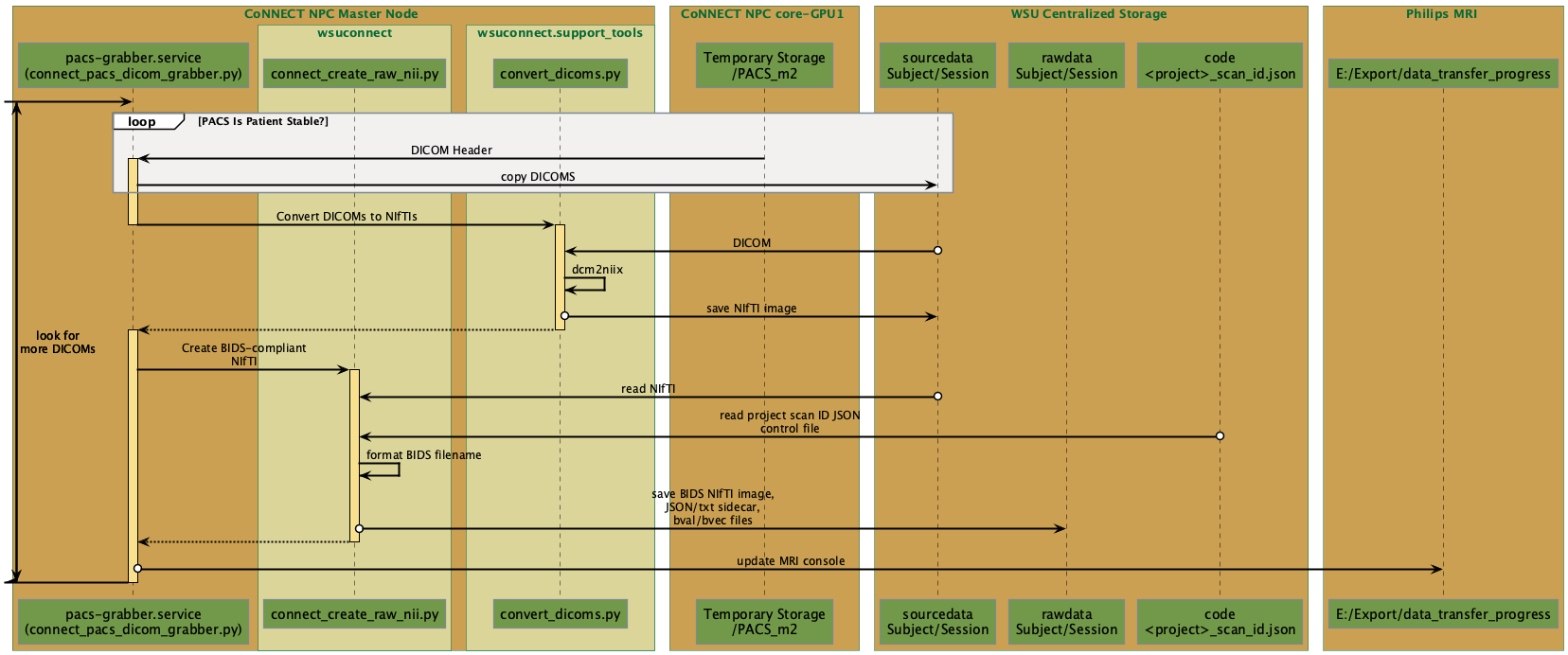
Fig. 10 Sequence diagram for the CoNNECT PACS DICOM grabber python function.
This function moves DICOM images from their local temporary PACS storage location (/resshare/PACS) to their associated sourcedata directory (Fig. 11), performs DICOM-to-NIfTI conversion via convert_dicoms.py, and moves the NIfTI files into a BIDS structure within the Project’s rawdata directory (Fig. 10). The <project identifier>, <subject identifier>, and <session identifer> (optional) are extracted from the DICOM header ‘Patient Name’ tag. These elements are space-delimited. The <session identifier> is appended to an acquisition date identifier using the format YYYYMMDD.
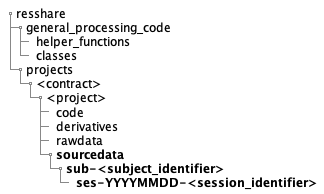
Fig. 11 Final location of source DICOM data following transfer from MRI via Orthanc PACS and connect_pacs_dicom_grabber.py.
Note
This function is continuously running in the background on the CoNNECT NPC master node (and loaded at startup) as the pacs-grabber.service.
This function can be executed via command-line only using the following options, HOWEVER, beware to ensure the pacs-grabber.service is stopped prior to running:
$ connect_pacs_dicom_grabber.py
- -h, --help
show the help message and exit
- -v, --version
display the current version
connect_rawdata_check.py
This function creates a table to indicate the absence (0) or presence (1) of MRI rawdata (NIfTI). Rawdata are identified via the project’s scan ID JSON control file. An output table in CSV format is created in the Project’s ‘processing_logs’ directory titled <project_identifier>_rawdata_check.csv.
This function can be executed via command-line only:
$ connect_rawdata_check.py -p <project_identifier>
- -p PROJECT, --project PROJECT
REQUIRED This project’s searchTable will be queried for all NIfTI images to identify images matching those scan sequences present in the scan ID JSON control file.
- -h, --help
show the help message and exit
- --progress
verbose mode
- -v, --version
display the current version